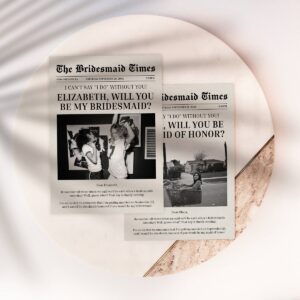
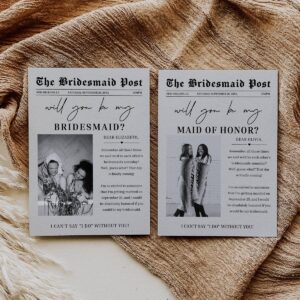
Every love story is worth sharing, but the bond you share with your bridesmaids is the headline of your heart. Invite your closest friends to be part of your bridal journey with this elegant newspaper-style proposal card, designed to turn your request into a cherished keepsake that captures your unique friendship.
This sophisticated template empowers you to create a professional look without any design experience, allowing you to easily upload a favorite photo and customize details to match your wedding vision. Whether you prefer a classic monochromatic look or a vibrant pop of color, the intuitive editing tools ensure your vision comes to life effortlessly.
Once your masterpiece is complete, you have the flexibility to print high-quality cards or share your news instantly via text, email, or social media for modern convenience.
Elevate your bridal party proposal with a touch of vintage charm and modern sophistication that your friends will treasure as they prepare to celebrate this beautiful new chapter alongside you.
How to Edit
Step-by-Step Instructions
- Access Your Template: After purchase, check your email for a Corjl link. Click it to access your editable template instantly—no downloads or software installation required.
- Customize Online: Edit directly in your browser using any device. Change text, fonts, colors, and add your personal details like event date, time, and location.
- Preview Your Design: Review your customizations in real-time. Make adjustments until your invitation looks perfect.
- Download Your File: Save your finished design as a high-resolution PDF, JPG, or PNG file—ready for printing or digital sharing.
- Print or Share: Print at home on cardstock, use a professional printer, or send digitally via email or text message.
What You Can Edit
- All Text Fields: Customize fonts, sizes, colors, and positioning to match your style
- Design Elements: Adjust artwork placement, resize graphics, and modify colors
- Backgrounds: Delete existing backgrounds or add new ones from Corjl’s library
- Personal Photos: Upload your own images, QR codes, or event photos
- Back Side Design: Add a coordinating back design with photos or additional details
Design Integrity (What Can’t Be Changed)
- Template dimensions and orientation are fixed to ensure proper printing
- Some artwork elements are locked to maintain the overall design aesthetic
- Core design composition remains intact for professional results
Pro Tip: No design experience needed! Corjl’s intuitive editor makes customization simple and fun. You can edit on your computer for full control or make quick changes using your phone or tablet.
Access Your Template Anytime
Can’t find your email? No problem! Visit Corjl.com and enter your order information to instantly access all your purchased templates. Your designs are saved automatically, so you can return to edit them whenever needed.
File Formats Included
- PDF Format: Perfect for professional printing with options for bleed marks, trim marks, and multiple cards per page
- JPG Format: High-resolution images with customizable bleed and trim settings
- PNG Format: Transparent background support with professional print options
- Digital Size: 1080 x 1920 px optimized for electronic invitations sent via text or email
Printing Guide
Professional Printing Made Easy
Get professional-quality prints with premium paper options, exceptional customer service, and free shipping anywhere in the United States. Plus, receive free envelopes with every order!
Home Printing Options
Save time and money by printing invitations yourself! Here’s what you need:
Recommended Paper
- Cardstock: 110-130 lb weight
- Color: White or cream
- Finish: Matte or glossy
- Brands: Neenah, Strathmore, Georgia-Pacific
Printer Settings
- Quality: Highest/Best setting
- Color: Full color (CMYK)
- Paper Type: Heavy/Cardstock
- Margins: Borderless or 0.25″
Money-Saving Tip: Always print a test copy on regular paper first to check alignment and colors before printing on expensive cardstock!
Local Printing Services
Need professional results without the hassle? Visit these popular print centers:
- Staples: Wide paper selection, same-day service available, helpful staff for guidance
- FedEx Office: Professional-grade printing, color matching services, binding options
- Office Depot/OfficeMax: Competitive pricing, loyalty rewards, frequent sales on printing
- Local Print Shops: Personalized service, unique paper options, support small businesses
- Walmart Photo Center: Budget-friendly option, quick turnaround, convenient locations
Standard Invitation Sizes
| Size | Dimensions | Best For | Envelope Size |
|---|
| 5″ x 7″ | 5 x 7 inches | Standard invitations, most popular size | A7 envelope |
| 4″ x 6″ | 4 x 6 inches | Postcards, save-the-dates | A6 envelope |
| A4 | 8.27 x 11.69 inches | International standard | C4 envelope |
| Letter | 8.5 x 11 inches | US standard, flyers | #10 envelope |
Digital Invitations (Eco-Friendly Option)
Save paper and postage by sending your invitations digitally! Perfect for modern celebrations:
- Email: Send as a PDF attachment or embedded image for easy viewing
- Text Message: Share via SMS or WhatsApp using the 1080 x 1920 px digital format
- Social Media: Post to Facebook events, Instagram stories, or private groups
- QR Codes: Add a QR code to your invitation linking to event details or RSVP forms
Eco Tip: Consider sending digital invitations to reduce paper waste, then print only a few copies as keepsakes or for guests without email access.
Expert Printing Tips
- Color Calibration: Colors may vary between screen and print. Order a test print to check accuracy.
- Bleed Settings: Use the bleed option if printing edge-to-edge designs to avoid white borders.
- Bulk Discounts: Most print shops offer discounts for orders of 25+ invitations.
- Timing: Order prints 2-3 weeks before your event to allow time for addressing and mailing.
- Paper Weight: Heavier cardstock (130 lb) feels more premium but may require extra postage.
- Envelope Liners: Add coordinating liners for an extra touch of elegance (available at craft stores).
Product Details
What’s Included in Your Download
Complete Invitation Package
Your purchase includes everything you need to create beautiful, professional invitations. Edit online instantly—no waiting, no software downloads, no design experience required!
File Formats & Sizes
| Format | Size | Best Use | Features |
|---|
| PDF | 5″ x 7″ | Print invitations | Bleed, trim marks, multiple per page |
| JPG | High-res 300 DPI | Professional printing | Bleed, trim marks options |
| PNG | High-res 300 DPI | Transparent backgrounds | Bleed, trim marks options |
| Digital | 1080 x 1920 px | Email, text, social media | Optimized for digital sharing |
Template Features
Instant Access
No waiting for files to arrive! Access your template immediately after purchase and start editing within seconds.
Cloud-Based Editing
Edit directly in your browser—no software downloads or installations required. Works on any device!
Mobile Friendly
Make quick edits on your phone or tablet. Full editing capabilities available on desktop computers.
Fully Customizable
Change text, fonts, colors, and add your own photos. Make it uniquely yours!
Auto-Save Feature
Your edits are automatically saved. Return anytime to make changes or download again.
Unlimited Downloads
Download your customized design as many times as you need—perfect for reprints!
System Requirements
Compatible with: All modern web browsers including Chrome, Firefox, Safari, and Edge. Works on Windows, Mac, iOS, and Android devices. Reliable internet connection required for editing. For best experience, use a desktop or laptop computer for full editing capabilities.
Technical Specifications
- Resolution: 300 DPI (print quality) / 72 DPI (digital sharing)
- Color Mode: RGB (digital) / CMYK (print-ready)
- Orientation: Portrait (vertical) layout
- Print Ready: Includes crop marks, bleed areas, and trim guides
- Font Licensing: All fonts are commercially licensed and embedded in template
- Image Quality: High-resolution graphics suitable for professional printing
- File Compatibility: Works with Adobe Acrobat, Mac Preview, Windows Photos, and all major image viewers
License & Usage Rights
Personal Use License Includes:
- ✅ Print unlimited copies for your personal event
- ✅ Share digitally with your guests via email, text, or social media
- ✅ Edit and customize for your specific needs
- ✅ Use for one-time personal celebrations (birthdays, weddings, showers, etc.)
Not Permitted:
- ❌ Reselling or redistributing the template files
- ❌ Sharing access links with others
- ❌ Commercial use without proper licensing
- ❌ Claiming the design as your own work
Need commercial licensing for event planning businesses? Contact us for information about our commercial license options.
Still Have Questions?
We’re here to help! For detailed answers about customization, printing, technical issues, or licensing:
Visit Our FAQ Page
Satisfaction Guaranteed: We stand behind the quality of our templates. If you experience any technical issues accessing or editing your template, our support team is ready to assist you promptly.




Reviews
There are no reviews yet.